WordPress Emails Going to Spam? How to Fix It & Improve Deliverability (Complete Guide)
If your WordPress emails are being sent but keep landing in the spam or junk folder, you’re not alone. This is one of the most frustrating WordPress issues because everything looks fine – yet users never see your emails.
Whether it’s:
Contact form notifications
WooCommerce order emails
Password reset emails
User registration emails
If they land in spam, your website loses trust, conversions, and credibility.
In this complete guide, you’ll learn:
Why WordPress emails going to spam
How email providers judge your site
Step‑by‑step fixes (beginner‑friendly)
How to prevent this issue long‑term
No technical jargon. No risky steps. Let’s fix it properly.
Why WordPress Emails Go to Spam (The Real Reason)
WordPress sends emails using the default PHP mail() function.
This is the core problem.
What’s Wrong With PHP Mail?
No proper authentication
No sender reputation
No verification headers
Shared hosting IPs are often abused
Email providers like Gmail, Outlook, Yahoo don’t trust these emails.
So even if the email is delivered, it’s flagged as:
“Unverified sender” → Spam folder
How Email Providers Decide Spam vs Inbox
Email services check four main things:
1. Sender Authentication
They look for:
SPF
DKIM
DMARC
Without these, emails look suspicious.
2. From Address Mismatch
If your email says:From: admin@gmail.comSent from: yourwebsite.com
 That’s a red flag.
3. Server Reputation
Shared hosting servers often send:
Bulk emails
Spam from other sites
You suffer even if you did nothing wrong.
4. Email Content
Too many:
Links
Images
Promotional phrases
Can also trigger spam filters.
Signs Your WordPress Emails Are Going to Spam
You might notice:
Contact form emails never appear
WooCommerce customers say they didn’t get order emails
Password reset emails missing
Emails appear only in spam/junk folder
If emails send but aren’t seen, it’s a deliverability issue – not a sending issue.
(If emails are not sending at all, see our guide on How to Fix WordPress Not Sending Emails )
Step 1: Use a Proper From Email Address (Very Important)
Never use:admin.cominfo.com
Correct Format:
Why?
Matches your domain
Builds trust with mail servers
Reduces spam flags instantly
Update this in:
WordPress settings
Contact form plugin
WooCommerce email settings
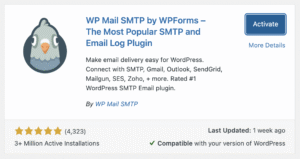
Step 2: Stop Using PHP Mail (Most Critical Fix)
PHP mail is unreliable and outdated.
What’s the Alternative?
SMTP (Simple Mail Transfer Protocol)
SMTP:
Authenticates your emails
Adds proper headers
Improves deliverability massively
This single change fixes 80% of spam issues.
Step 3: Configure SMTP the Right Way
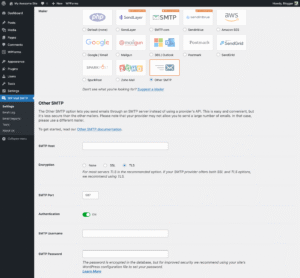
You can use SMTP via:
Gmail
Outlook
Hosting email
Dedicated email services
SMTP ensures emails are:
Verified
Logged
Trusted
Once SMTP is active:
Emails stop landing in spam
Delivery rate improves instantly
 Misconfigured SMTP can still fail – follow setup carefully.
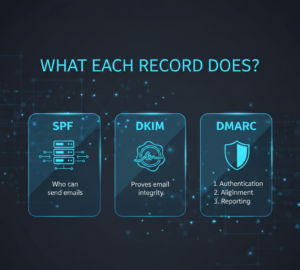
Step 4: Add SPF, DKIM & DMARC Records
These records tell email providers:
“Yes, this server is allowed to send emails for this domain.”
What Each Record Does
SPF → Who can send emails
DKIM → Proves email integrity
DMARC → Tells providers how to handle failures
Without these, emails look forged.
Most email providers give copy‑paste DNS records – no coding needed.
Step 5: Avoid Spam‑Triggering Content
Even authenticated emails can go to spam if content looks suspicious.
Avoid:
ALL CAPS
Too many links
Click‑bait phrases
Image‑only emails
Use:
Plain language
Balanced text‑to‑link ratio
Clear subject lines
Good content = better inbox placement.
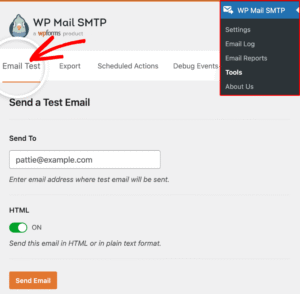
Step 6: Test Email Deliverability Properly
After fixes, always test:
Gmail
Outlook
Yahoo
Check:
Inbox vs spam
Sender details
Authentication results
Some emails may take a few hours to stabilize – that’s normal.
Step 7: Hosting Quality Matters (Underrated)
Cheap hosting = shared spammy IPs.
If your hosting:
Blocks SMTP ports
Has poor IP reputation
Your emails suffer no matter what.
If you’re facing multiple WordPress issues, see our guide on WordPress Admin Not Loading
How Long Until Emails Stop Going to Spam?
Usually:
Immediate improvement after SMTP
Full trust builds in 24–72 hours
Email reputation improves over time.
Common Mistakes That Keep Emails in Spam
 Using free email as sender Skipping DNS records Sending bulk emails suddenly Ignoring spam content rules
Avoid these and you’ll stay safe.